Ratio9 1.2.1 · Wavetable synthesizer
Your sound.Your AI.
Design sounds by hand, or connect a compatible AI to work in the synth alongside you, on the same oscillators, modulation and effects.
AI is optional. It works with AI apps that support local stdio MCP servers, using your own AI account.
AI control
Bring your AI.
Switch on AI access and a compatible AI app can work Ratio9 with you: describe a sound, and it sets the same controls you would. It’s optional, and off until you turn it on.
What a connected AI can do
- Read and change synth parameters
- Choose wavetables from your libraries
- Shape modulation
- Name macros
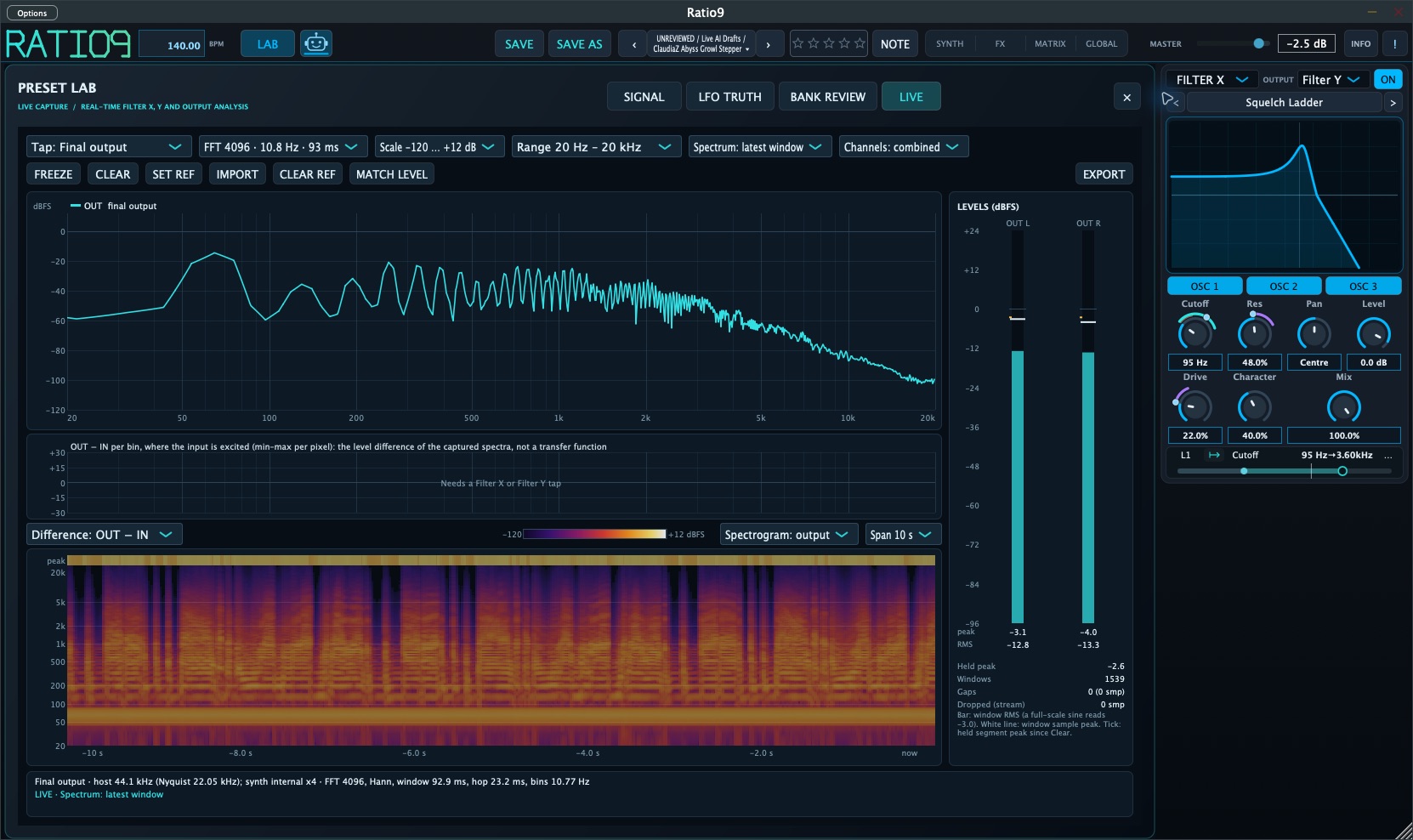
- Read the live spectrum and spectrogram
- Save presets
Works with installed AI apps that support local stdio MCP, not with every AI app. You need your own AI app and account.
Website demo · it doesn’t connect to anything
AI access on
Ready. Smiling, no glow. You enabled AI access in the robot’s panel, so a compatible AI app can connect.
Labs, included
See your sound as it evolves.
Ratio9’s live spectrogram reveals energy across frequency and time, alongside a spectrum of the sound playing now.
A connected AI can request fresh spectrum and spectrogram measurements while you play, helping it inspect harmonics, frequency balance and changes as you work.
Questions about AI control
How does the AI connect?
Through MCP, the Model Context Protocol, over a local stdio connection on your Mac: your AI app starts Ratio9’s built-in AI helper, which works the synth. Click Ratio9’s robot, then use Copy AI Setup for connection settings and Copy AI Prompt for your assistant’s starting prompt. Open AI Information opens the included guides to the connection and Ratio9’s controls.
Which AI apps can connect?
Installed AI apps that support local stdio MCP servers, using the settings from Copy AI Setup. Ratio9’s AI control has been used with Claude Code. Other apps are expected to work the same way but haven’t all been tested, and support varies. AI chat websites, and apps that only offer cloud or remote MCP connections, can’t connect.
Is giving an AI the documentation enough?
No. Ratio9’s AI Information teaches an assistant how the synth works during that conversation, but it doesn’t connect anything or permanently train the AI. Only an AI app connected through local MCP can read or change your sound.
Do I need an AI app or account?
Only for AI control. Ratio9 works completely by hand, and AI access stays off until you switch it on. To use AI you need a compatible AI app, with its own account and any subscription it requires; these come from the AI provider, separately from Ratio9.
Does my data stay on my Mac?
Not necessarily. The connection between Ratio9 and your AI app is local, but that doesn’t make the AI model local. What the AI reads and changes through Ratio9, such as parameter values, wavetable names, spectrum readings and your requests, can be sent to your AI provider and is handled under their terms.
Can several AI apps control Ratio9 at once?
No. One connected AI at a time can make changes, and the robot’s tooltip shows which one is connected.
Will the AI make good sounds?
That depends on the AI model and on how clearly you describe what you want. It works the same controls you do, so you can keep shaping the result by hand.
Oscillators and Mod Flow
Three wavetable oscillators that play each other.
Each oscillator has two warp stages and unison; draw your own waves or import them in the wavetable editor. Mod Flow connects them with FM, phase distortion, ring or amplitude modulation, and every connection has its own envelope, edited as a curve. A dedicated sub oscillator and a separate sampler, with sample, multisample, granular and spectral playback, sit alongside.
Modulation
Shape the movement.
Draw curves and rhythmic patterns that loop or play once. Six shared LFOs reach supported oscillator, filter and effect controls: drag one onto a control to assign it. Eight macros bring many changes together into one playable gesture.
Filters and effects
Two filters. Effects on every band.
Run two filters in parallel or one into the other, and follow the response on an interactive display. Then split the sound into frequency bands, each with its own effect chain, alongside shared PRE and POST racks: distortion, dynamics, filter, EQ, delay, reverb and more.
Availability
Ratio9 1.2.1 is on the Download page.
The Download page lists each approved file with its requirements, size and SHA-256 checksum.
One installer: the free Standalone app, plus the VST3 and AU plug-ins for $79.99 USD, paid once, on two Macs at a time, with all future Ratio9 software updates included. Details are on the Download page.